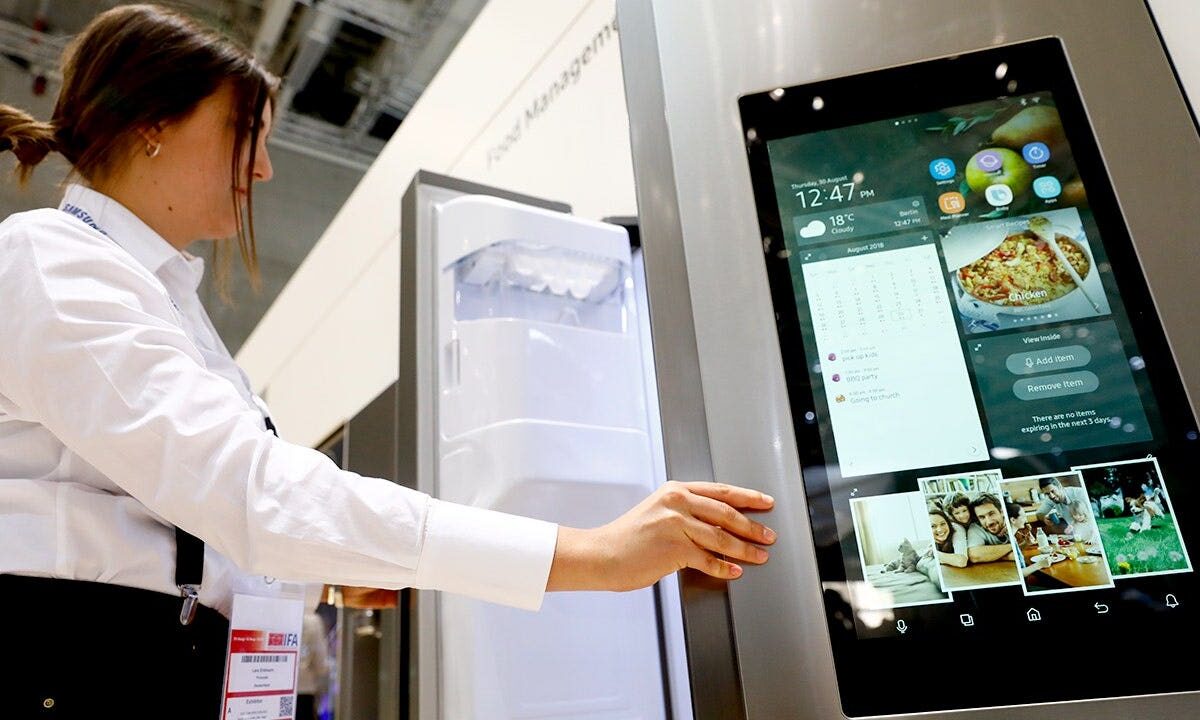
Software updates can add ads on paid devices — and that change can arrive after you thought the purchase was final. Journalists reported examples including Samsung Family Hub refrigerators showing a Cover Screen widget with curated ads, pop-up messages in some Stellantis vehicles and promotional prompts in Windows 11. If an ad suddenly appears on a device you already own, you can often turn it off by checking Settings right after an update.
This explainer summarizes the reporting, gives the exact Samsung Settings path to disable Cover Screen ads, lists practical opt-out steps for cars and computers, offers a quick device checklist, and records company statements so you know what to expect next.
What happened with ads on paid devices
Fox News reported that Samsung rolled a Cover Screen widget to some Family Hub refrigerators in the U.S. that can surface weather, calendar items, news and curated ads. The same reporting described Stellantis using its In‑Vehicle Message system to deliver owner communications that at times included promotional content. Microsoft can surface promotional-style content in Windows 11 in places such as the lock screen and Start menu, reporters noted.
The reporting ties these changes to software updates or feature rollouts. In plain terms: a firmware or software update can add a widget, theme or message flow that contains promotions or recommendations — turning a device you paid for into a surface for curated content.
How Samsung describes the Cover Screen ads
Samsung told reporters it piloted a Cover Screen widget on Family Hub refrigerators and launched it after the pilot concluded. Samsung described the widget as cycling weather, calendar items, news and curated ads and said customers can disable it without losing other core features.
Samsung provided an explicit Settings path for turning the ads off: Settings > Advertisements > Cover screen Ads. Samsung also said dismissed ads will not reappear during that ad’s campaign period and that the percentage of users who chose to disable the widget has been in the low single-digits, according to the company.
How to stop similar ads on cars and other devices
Start by searching Settings for terms such as ads, recommendations, personalization, notifications or message settings. Below are device-specific steps reporters highlighted or that companies confirmed.
Samsung Family Hub: On the Family Hub screen open Settings > Advertisements > Cover screen Ads and toggle the feature off. Samsung also said switching the Cover Screen theme to Art or Album will suppress the widget, according to company comments shared with reporters.
Stellantis / Uconnect: Stellantis told reporters that the In‑Vehicle Message system can deliver ownership messages and that owners could opt out of promotional-style messages by calling customer service or by updating their profile or Message Settings on their vehicle brand account (for example, the Ram owner account). Stellantis also said it has not run the referenced promotional messages since mid‑fall 2025 and does not have similar campaigns planned, per the company’s statement to reporters.
Windows 11: Check Settings for lock screen options (Windows Spotlight), Start menu recommendations, and account-related notifications. Microsoft’s wording for these options can change; search Settings for “recommendations,” “tips,” “suggestions,” “offers” or “notifications” to find current toggles that reduce promotional prompts.
Other smart devices: For TVs, smart speakers, thermostats and other connected appliances, inspect menus labeled Advertisements, Recommendations, Personalization, Notifications, Offers or Tips. If a new widget or pop-up appears after an update, look for a single toggle to disable that feature, or remove the widget/theme assignment in the theme or home-screen picker.
Quick checklist: where to look after updates
- Settings > Advertisements / Ads — (exact Samsung path: Settings > Advertisements > Cover screen Ads)
- Settings > Personalization / Theme / Cover Screen pickers
- Notifications, Recommendations, Tips, Offers, Suggestions menus
- Account or Message Settings tied to a manufacturer or vehicle brand account
- Lock screen / Start menu settings on PCs (search for Spotlight, suggestions or recommendations)
What companies said and what to watch next
Samsung described the Family Hub Cover Screen as a post-pilot widget that mixes practical items with curated ads and provided the precise path to disable it. Stellantis characterized its In‑Vehicle Message technology as a channel for important owner communications and told reporters the promotional-style messages in question ended in mid‑fall 2025 and are not planned going forward. Microsoft did not provide an on‑record comment for the reporting about promotional prompts in Windows.
These are company statements and represent each firm’s position. Reporters were not able to independently verify every claim about how often ads appear, how they are targeted or how many users disable them. Treat the company replies as official explanations rather than independent verification of frequency or impact.
What to expect and next steps
After updates, expect manufacturers to add optional widgets, themes or message flows that can include recommendations or promotional content. The practical outcome for most owners is that an added widget or message flow will be controllable via Settings, but discovery may require searching menu labels or switching a theme. If you prefer not to receive promotions, prioritize checking Advertisements, Personalization and Message Settings after any major update.
If a setting is hard to find, use the device’s Settings search, check your manufacturer account portal for message preferences, or contact customer service. For cars, calling the vehicle brand’s customer support line or adjusting Message Settings in your owner/account profile are the opt-out paths Stellantis specifically referenced to reporters.
Quick opt-out reference
Stellantis vehicles (Uconnect): Call customer service or update your profile/Message Settings on your vehicle brand account to opt out of promotional messages.
Windows 11: Search Settings for Spotlight, recommendations, tips or offers and turn off the corresponding toggles.
FAQ
How do I stop ads on my Samsung Family Hub?
Go to Settings > Advertisements > Cover screen Ads and turn the widget off. Samsung also said switching the Cover Screen theme to Art or Album will prevent the widget from appearing.
Can carmakers push ads to my vehicle and how do I opt out?
Some automakers have used in‑vehicle messaging systems to send owner communications that included promotions. Stellantis told reporters owners could opt out by calling customer service or updating their profile or Message Settings on their vehicle brand account.
Where else should I check for new promotional settings after updates?
Scan Settings menus for Advertisements/Ads, Recommendations, Notifications, Tips, Offers, Personalization and any account or message-preference pages tied to your device manufacturer. After updates, verify whether a new widget or pop-up can be toggled off or suppressed by changing themes.
Reporting for this article is based on Fox News, “You paid for it. So why is your device showing ads?” For the original reporting, see: https://www.foxnews.com/tech/why-your-paid-for-device-shows-ads.